QPushButton is a class in the Qt framework that represents a clickable button widget. In PySide6, you can use the QPushButton class to create buttons that interact with a graphical user interface (GUI), executing specific functions when the user clicks the button.
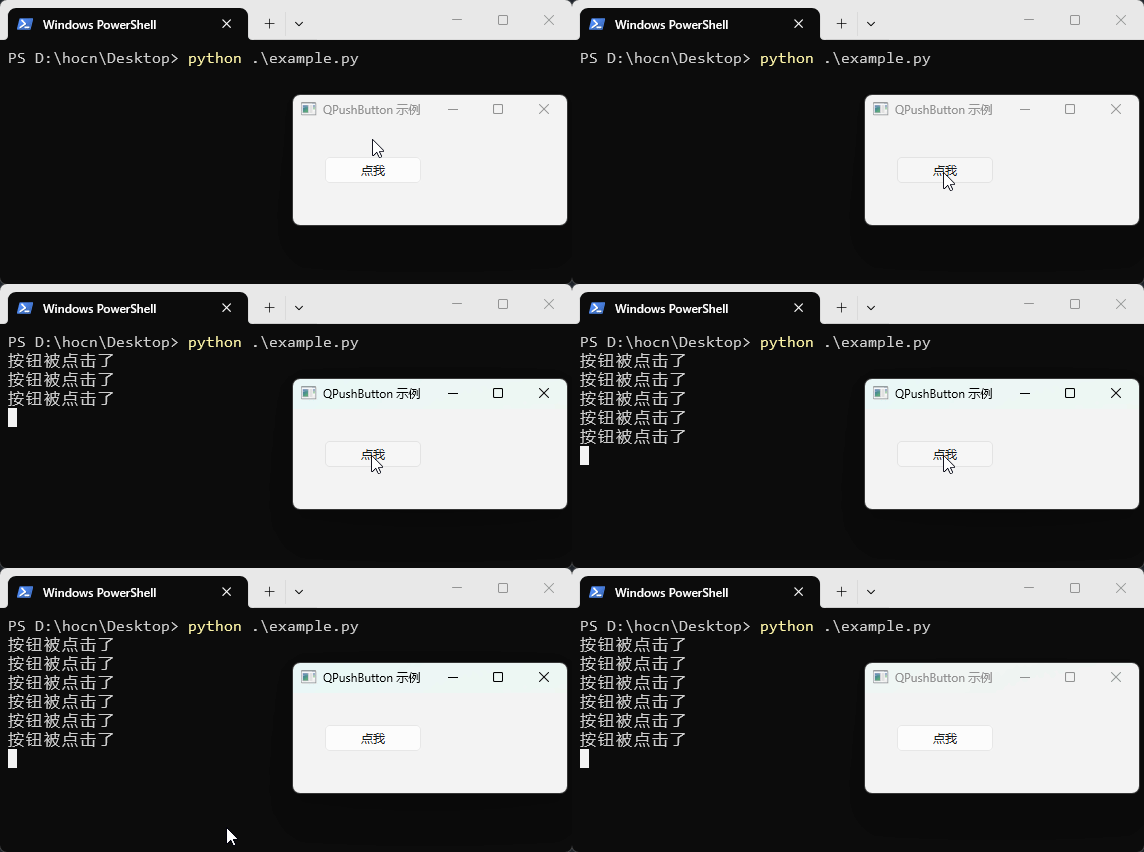
QPushButton Example
The following example will use QPushButton to create a button that prints a message when clicked:
import sys
from PySide6.QtCore import Slot
from PySide6.QtWidgets import QApplication, QMainWindow, QPushButton

class MainWindow(QMainWindow):
    def __init__(self):
        super().__init__()
        self.initUI()

    def initUI(self):
        self.setWindowTitle("QPushButton Example")

        # Create a QPushButton object
        self.button = QPushButton("Click me", self)
        # Move the button to position 30,30
        self.button.move(30, 30)
        # Connect the button's click signal to the slot function
        self.button.clicked.connect(self.showInfo)

    @Slot()# Use decorator
    def showInfo(self):
        print("Button was clicked")


if __name__ == '__main__':
    app = QApplication(sys.argv)
    window = MainWindow()
    window.show()
    sys.exit(app.exec())
QPushButton Class Initialization Methods
QPushButton provides multiple construction methods, with details of the construction parameters as follows:
QPushButton(parent=None)
QPushButton(text, parent=None)
QPushButton(icon, text, parent=None)
parent: The parent widget of the button; if not specified, it is automatically associated with the default top-level window;text: The text displayed on the button;icon:PySide6.QtGui.QIconobject, the icon displayed on the button;
Examples of the three construction methods are as follows:
from PySide6.QtWidgets import QPushButton
from PySide6.QtGui import QIcon

# Button without text
button = QPushButton()
# Button with text
button = QPushButton("Button text")
# Button with icon and text
button = QPushButton(QIcon("icon.png"), "Button text")
QPushButton Common Signals
clicked Signal
The most commonly used signal, triggered when the button is clicked (pressed and released):
button.clicked.connect(lambda: print("Button was clicked"))
pressed Signal
Triggered the moment the button is pressed (before release):
button.pressed.connect(lambda: print("Button pressed"))
released Signal
Triggered the moment the button is released, regardless of whether the mouse pointer is still on the button:
button.released.connect(lambda: print("Button released"))
QPushButton Common Properties and Methods
| Property/Method (Example) | Description |
|---|---|
.text() |
Get button text |
.setText("text") |
Set button text |
.icon() |
Get button icon |
.setIcon(icon) |
Set button icon |
.iconSize() |
Get icon size |
.setIconSize(QSize(w,h)) |
Set icon size |
.isEnabled() |
Get enabled status |
.setEnabled(bool) |
Set enabled status |
.isVisible() |
Get visibility |
.setVisible(bool) |
Set visibility |
.isHidden() |
Whether hidden |
.hide() |
Hide button |
.show() |
Show button |
.isCheckable() |
Get if toggleable |
.setCheckable(bool) |
Set toggleable mode |
.isChecked() |
Get checked status |
.setChecked(bool) |
Set checked status |
.toggle() |
Toggle checked status |
.isFlat() |
Get if flat style |
.setFlat(bool) |
Set flat style |
.isDefault() |
Get if default button |
.setDefault(bool) |
Set default button |
.isAutoDefault() |
Get if auto default |
.setAutoDefault(bool) |
Set auto default |
.autoRepeat() |
Get auto repeat status |
.setAutoRepeat(bool) |
Set auto repeat |
.autoRepeatDelay() |
Get initial delay (milliseconds) |
.setAutoRepeatDelay(int) |
Set initial delay |
.autoRepeatInterval() |
Get repeat interval (milliseconds) |
.setAutoRepeatInterval(int) |
Set repeat interval |
.click() |
Simulate click |
.animateClick() |
Simulate click with animation |
.animateClick(ms) |
Simulate click with animation (specified milliseconds) |
.press() |
Simulate press |
.release() |
Simulate release |
.setStyleSheet(css) |
Set style sheet |
.styleSheet() |
Get style sheet |
.setToolTip(text) |
Set tooltip |
.toolTip() |
Get tooltip |
.setToolTipDuration(ms) |
Set tooltip display duration |
.setStatusTip(text) |
Set status bar tip |
.statusTip() |
Get status bar tip |
.setWhatsThis(text) |
Set "What's This" help |
.whatsThis() |
Get "What's This" help |
.setAccessibleName(name) |
Set accessible name |
.accessibleName() |
Get accessible name |
.setAccessibleDescription(desc) |
Set accessible description |
.accessibleDescription() |
Get accessible description |
.setCursor(cursor) |
Set mouse cursor |
.cursor() |
Get mouse cursor |
.unsetCursor() |
Reset mouse cursor |
.setFont(font) |
Set font |
.font() |
Get font |
.setGeometry(x,y,w,h) |
Set position and size |
.geometry() |
Get geometry position |
.setFixedSize(w,h) |
Set fixed size |
.setFixedWidth(w) |
Set fixed width |
.setFixedHeight(h) |
Set fixed height |
.resize(w,h) |
Set size |
.size() |
Get size |
.width() |
Get width |
.height() |
Get height |
.move(x,y) |
Move position |
.pos() |
Get position |
.x() |
Get X coordinate |
.y() |
Get Y coordinate |
.setMenu(menu) |
Set associated menu |
.menu() |
Get associated menu |
.setContextMenuPolicy(policy) |
Set right-click menu policy |
.setShortcut(key) |
Set shortcut key |
.shortcut() |
Get shortcut key |
.setAutoExclusive(bool) |
Set auto exclusive |
.autoExclusive() |
Get auto exclusive |
.setFocus() |
Set focus |
.setFocusPolicy(policy) |
Set focus policy |
.hasFocus() |
Whether has focus |
.clearFocus() |
Clear focus |
.setObjectName(name) |
Set object name (for style sheets) |
.objectName() |
Get object name |
.parent() |
Get parent widget |
.setParent(parent) |
Set parent widget |
.window() |
Get window |
.setProperty(name, value) |
Set dynamic property |
.property(name) |
Get dynamic property |
.clicked.connect(func) |
Connect click signal |
.pressed.connect(func) |
Connect press signal |
.released.connect(func) |
Connect release signal |
.toggled.connect(func) |
Connect toggle signal |
.blockSignals(bool) |
Block/resume signals |
.signalsBlocked() |
Check if signals are blocked |
.disconnect() |
Disconnect all signal connections |
.deleteLater() |
Delete object later |
.setAttribute(attr, on) |
Set window attribute |
.testAttribute(attr) |
Test window attribute |