In Rust programming, comments are key tools for code documentation and maintenance. Rust provides two main types of comments: regular comments and documentation comments, each with different purposes and syntax.
Regular Comments
Regular comments are used to add temporary explanations or disable parts of code in the code, and they do not affect the compilation output. Rust supports two forms of regular comments: line comments and block comments.
Line comments start with // and are suitable for single-line explanations. For example:
// This is a line comment, used to explain the next line of code
let x = 5; // Initialize variable x
Block comments start with /* and end with */, and can span multiple lines. For example:
/*
This is a block comment,
used to explain complex logic in detail.
*/Note: Regular comments are ignored during compilation and are mainly used for internal communication among developers.
Documentation Comments
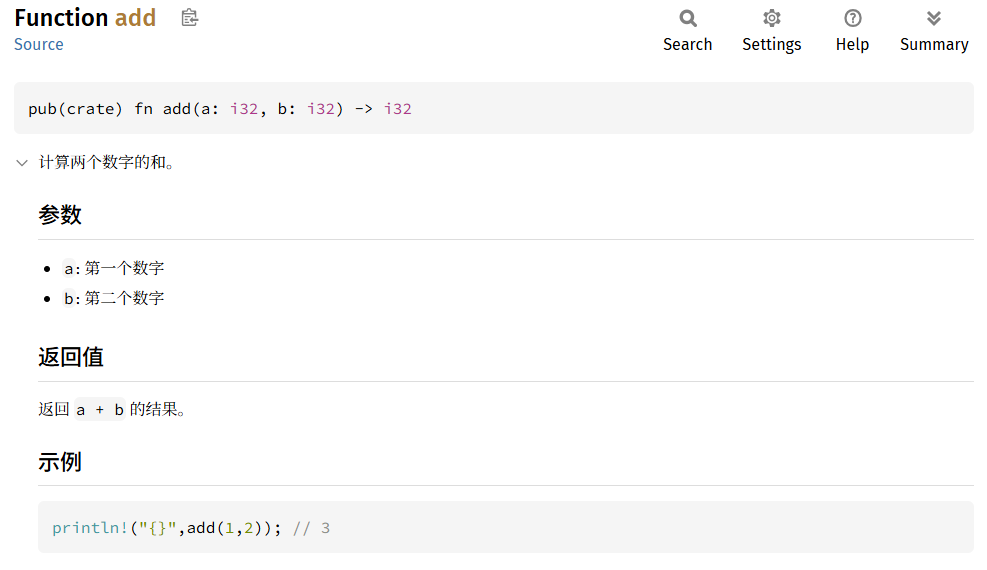
Documentation comments are used to generate formal API documentation, which can be generated as HTML documentation via the cargo doc command. Rust supports two types of documentation comments: line documentation comments and block documentation comments.
Line documentation comments start with /// and are typically used for documenting functions, structs, or modules. For example:
/// Calculates the sum of two numbers.
///
/// # Parameters
/// - `a`: The first number
/// - `b`: The second number
///
/// # Return Value
/// Returns the result of `a + b`.
///
/// # Example
/// ```
/// println!("{}",add(1,2)); // 3
/// ```
fn add(a: i32, b: i32) -> i32 {
    a + b
}
Tip: Documentation comments support Markdown syntax, allowing the addition of code blocks, lists, and other formats to enhance document readability.
Block documentation comments are written in the format /** ... */ and are suitable for longer documentation. For example:
/**
This module provides mathematical operation functionality.

Includes basic operations such as addition and subtraction.
*/
mod math {
    // Module content
}
Generating Documentation
Use the cargo doc command to generate documentation, which can be viewed in the src/target/doc directory;
You can add the --open parameter to automatically open it in a browser:
cargo doc --openDocumentation Effect Diagram