This article introduces how to use the certbot tool to apply for a free SSL certificate. An SSL certificate is a digital certificate used to establish an encrypted connection between a website and a user's browser, ensuring data transmission security.
Enabling HTTPS on a website requires an SSL certificate.
Before You Begin
- You need to add a DNS TXT record for your domain to verify domain ownership.
- The certificate applied for is a Let's Encrypt DV certificate.
- The certificate is valid for three months.
- Wildcard certificates are supported.
What is Let's Encrypt
Let's Encrypt is a free, automated, and open certificate authority (CA) operated by the nonprofit organization Internet Security Research Group (ISRG). Before Let's Encrypt emerged, SSL certificates were expensive (ranging from hundreds to thousands of yuan per year), making them unaffordable for many small websites, which were forced to use insecure HTTP. Let's Encrypt's goal is to popularize encryption and make the internet more secure. It is currently the most popular and widespread free certificate authority in the world, transforming HTTPS from a "luxury" into a "necessity" and significantly advancing internet security.
Certificate Application Process
Install certbot:
certbot is a free, open-source tool for automatically obtaining and renewing Let's Encrypt certificates. For more detailed usage, refer to the official certbot website:
Check if the installation was successful:
certbot --version
Displaying the certbot version information indicates successful installation.
Run the following command to apply for a certificate:
sudo certbot certonly --manual --preferred-challenges dns -d example.com -d *.example.com
This command applies for a wildcard SSL certificate. Wildcard certificates require DNS validation.
Explanation of command parameters:
certonly: Obtain the certificate only, without installing it on the web server.--manual: Manual mode, requiring manual DNS validation steps.--preferred-challenges dns: Use DNS for domain ownership validation.-d example.com: The main domain. The wildcard domain *.example.com does not cover example.com itself, so it needs to be added separately.-d *.example.com: The wildcard domain.
After running the command, wait for a moment. You will be asked whether you agree to have your IP address publicly logged:
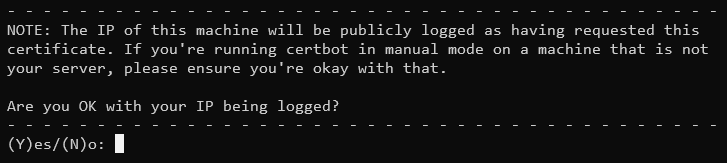
Let's Encrypt will publicly log the IP address used for the certificate application and the time of the request. After the certificate is issued, anyone can potentially query this information through certain websites. If you do not want your server's IP address exposed, do not perform the certificate application on the server itself.
Enter Y to continue; your IP address will be logged and made public. Enter N to exit the application process.
Next, you will be prompted to add a DNS TXT record to verify domain ownership:
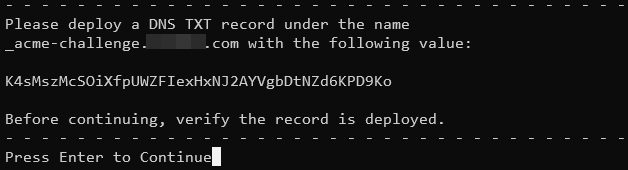
Go to your domain registrar's DNS settings page and add a TXT record named _acme-challenge with the value provided by certbot.
Wait for a moment to ensure the DNS record has propagated, then press Enter to continue and wait. (Additional validation may be required.) When you see a message similar to the one below, the application has succeeded:
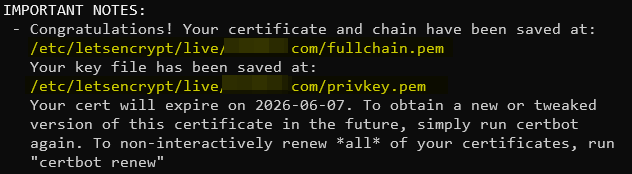
The certificate is valid for 3 months and is saved in the following location:
/etc/letsencrypt/archive/***  # Actual certificate file location
/etc/letsencrypt/live/***     # Symbolic links to certificates
The certificate includes 4 files:
cert1.pem: The public key certificate for the domain.chain1.pem: The Let's Encrypt intermediate certificate.fullchain1.pem: The complete certificate chain.privkey1.pem: The private key file, keep it secret!
The number 1 indicates the version, which increments with each renewal.
Example Nginx configuration using the symbolic links in the live directory for certificate paths:
ssl_certificate /etc/letsencrypt/live/example.com/fullchain.pem;
ssl_certificate_key /etc/letsencrypt/live/example.com/privkey.pem;
Certificate Renewal
The manual DNS validation method described here cannot be automated for renewal. It is recommended to apply for a new certificate.