The print() function is one of Python's built-in functions used to output specified objects. It can accept multiple parameters separated by commas, which will be output sequentially with spaces separating them by default. After output completes, the print() function automatically adds a newline character at the end.
Function Syntax
print(*objects, sep=' ', end='\n',
    file=sys.stdout, flush=False)
Parameters:
*objects: Objects to output, can be multiple, separated by','.sep: Separator used when outputting multiple objects, defaults to a space.end: Terminator after output completes, defaults to a newline character'\n'.file: Which file to output content to, defaults to standard output.flush: Boolean value indicating whether to force buffer flush, defaults toFalse.
print() Function Examples
Basic usage:
print("Hello, World!")
# Multiple objects separated by commas
print("Hello", "World")

# Print variables
name = "Lee"
print("Hello,", name)

# Output lists
lst = ['a', 'b', 'c']
print(lst)
print(*lst)
Program Output
Hello, World!
Hello World
Hello, Lee
['a', 'b', 'c']
a b c
Specify sep separator when outputting multiple objects:
print("A", "B", "C")           # Default output: A B C
print("A", "B", "C", sep='')   # Output: ABC
print("A", "B", "C", sep='-')  # Output: A-B-C
Use end terminator:
print(1)  # Default newline
print(2)
print(3)

print('a', end='|')  # Specify terminator
print('b', end='-')
print('c')
Program Output
1
2
3
a|b-c
Output content to a file:
file1 = open('output.txt', 'w')

# Not displayed in terminal, written to file instead
print("Hello, world!", file=file1)

file1.close()
Use flush to force buffer flush:
Buffer flush rules:
- Terminal output defaults to line buffering, flushes on newline
- File output defaults to full buffering, flushes when buffer full or closed
import time

for i in range(5):
    # Replace default newline
    # Prevents immediate buffer flush
    # Not displayed immediately by default
    print(i, end=',')
    time.sleep(1)

print("done!")

for i in range(5):
    # Force immediate buffer flush
    print(i, end=',', flush=True)
    time.sleep(1)

print("done!")
Output Colored Content
For terminals supporting ANSI escape sequences, you can set colors for content:
# Basic color examples
print("\033[31mRed text\033[0m")
print("\033[32mGreen text\033[0m")
print("\033[33mYellow text\033[0m")
print("\033[34mBlue text\033[0m")
print("\033[35mPurple text\033[0m")
print("\033[36mCyan text\033[0m")
print("\033[37mWhite text\033[0m")
print("\033[90mGray text\033[0m")
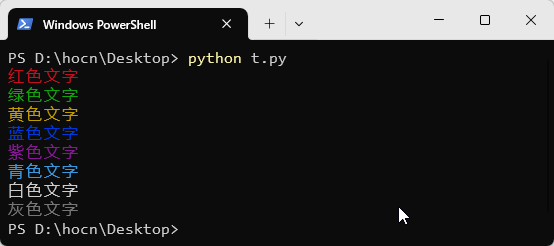
For more effects, refer to ANSI escape sequence formats.